Blog / Affiliate marketing
Facebook Ban: What Can You Get Banned For and How to Avoid It?
This article is updated regularly
Last update:
06 June 2025
A Facebook ban results from violating the platform's policies — most often through rushed account activity, low-quality or misleading ads, prohibited keywords, payment irregularities, or copyright infringement. Facebook's algorithm flags suspicious behavior automatically, and repeated or serious violations lead to account suspension or a permanent block on advertising and posting.
This guide breaks down every category of mistake that triggers a Facebook ban — from account warm-up errors to ad, payment, and policy violations — so you can promote on the platform safely and keep your account active in 2026.
What you'll learn from this article:
why Facebook flags accounts as suspicious and how to warm up a new profile,
the seven early-stage mistakes that most often lead to a Facebook ban,
which ad, payment, and content rules trigger automatic blocks,
how to protect your campaigns and appeal a ban if it happens.
Why did I get banned on Facebook?
A Facebook ban usually results from breaking the platform's policies or from behavior its algorithm reads as suspicious — rushed account setup, low-quality ads, prohibited words, or failed payments. The first safeguard for any new advertising profile is account "warm-up": a period of normal activity that signals a genuine, active user rather than an automated account.
When you set up a profile mainly for advertising, start with warm-up. Imitate a normal user: add an avatar, complete the basic profile information, and begin standard activity — adding friends, sharing posts, and liking content. This convinces the algorithm you are a real person and lowers ban risk. If you lack time, you can pay for warm-up services advertised on social forums and marketplaces. Either way, never rush the early days — read our guide on how to avoid getting your account blocked.
What should you avoid at the start of your activity?
At the start, the highest-risk mistakes are acting too fast, neglecting the main account, and changing settings, browsers, or IP addresses too often. Facebook's system detects attempts to trick the algorithm and flags profiles that look automated. The seven points below cover the early-stage behaviors that most reliably lead to a Facebook ban.
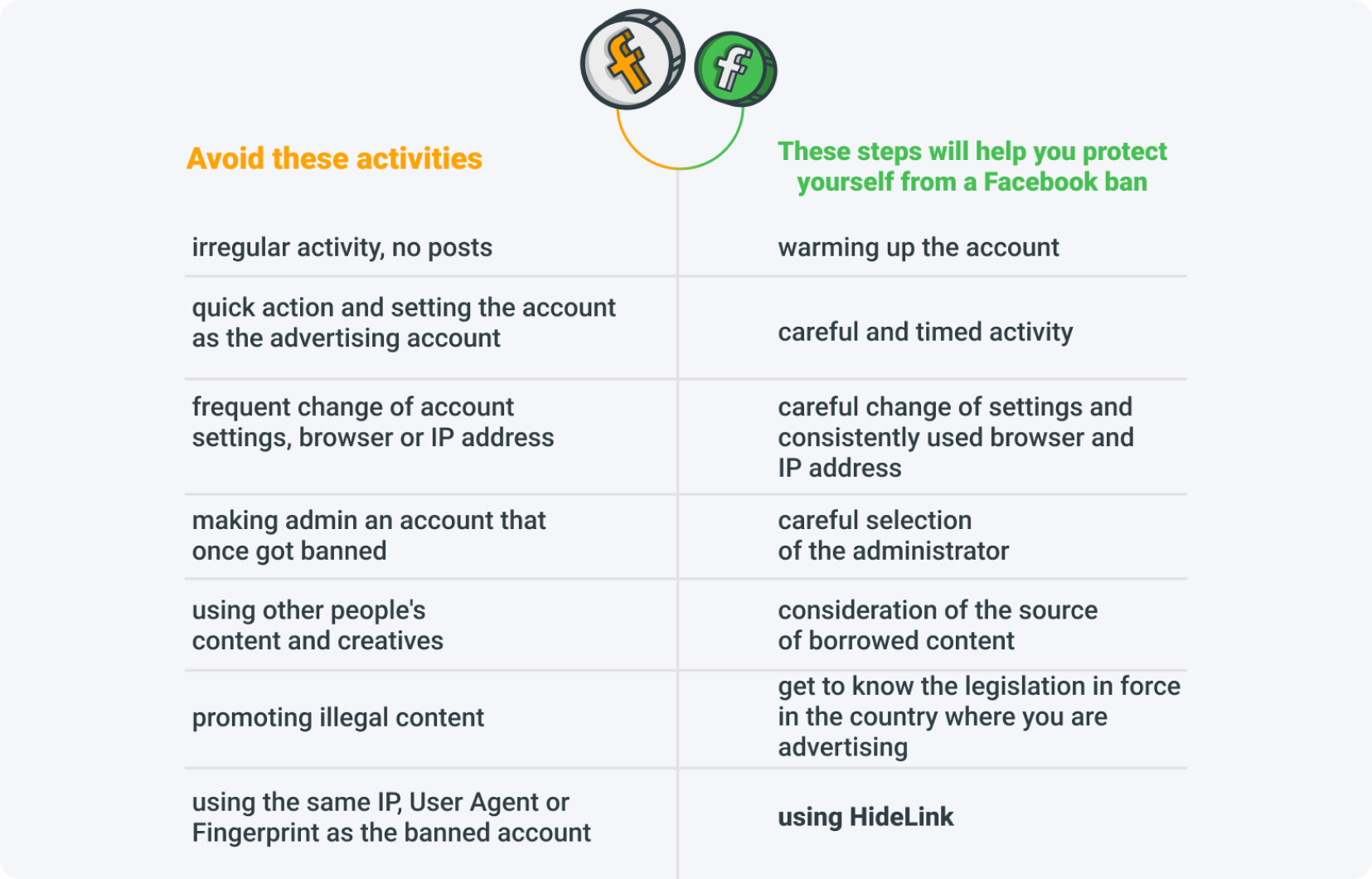
Acting too fast — warm-up should happen gradually. Setting an account as an advertising profile right after creation looks like an attempt to cheat the algorithm and often ends in a ban.
Neglecting the main account — a profile with no photos, friends, posts, or interactions that suddenly runs paid ads is automatically treated as suspicious.
Frequent changes to the account — editing usernames, passwords, or emails too often, and switching browsers, IP addresses, or login countries, raises red flags. If you must change them, use an anti-detect browser to keep a stable, reusable profile.
Making a banned user an admin — adding an account that has violated the rules and received a Facebook ban increases the platform's suspicion toward your account.
Ignoring copyright — using someone else's creatives or photos without permission or credit. Facebook checks creatives for authenticity and reports or bans infringing material.
Promoting offers illegal in the target country — advertising products forbidden in a given country leads to a ban. Check the local law before you launch.
Reusing the IP, User Agent, or fingerprint of a banned account — bots detect the match and ban the new account too. Managing your digital fingerprint helps you avoid this.
How does HideLink protect you from a Facebook ban?
HideLink is a link cloaker from MyLead — a system that hides the destination URL from the bots scanning social networks, which helps prevent a Facebook ban during the promotion of affiliate offers. Activation happens through a short application in the publisher panel; the generated cloaked link then replaces the raw offer URL inside campaigns.
The setup takes only a few minutes, and MyLead has prepared step-by-step instructions for the application. Try MyLead's HideLink to cloak your affiliate links before you promote them on Facebook and cut the risk of an automated block.

What causes Facebook bans on paid campaigns?
Paid campaigns trigger a Facebook ban mainly when a brand-new account sets a very large initial budget or launches ads from a profile with little prior activity. Both patterns look suspicious to the algorithm, which can suspend the account and forfeit the funds already spent — money that is not refunded once the ban is applied.
Setting a very large initial budget — a high budget on one of the first campaigns from a new account makes the algorithm suspicious and often leads to a ban and lost funds.
Launching from a dormant account — running ads from a profile with little or no recent traffic triggers a ban quickly; the account becomes suspicious and is eliminated fast.
How do you protect a campaign from a Facebook ban? Plan paid campaigns carefully, schedule them in time, and warm up the account first. You can also manage campaigns externally with dedicated tools — see our guide to media buying in affiliate marketing.
What ad mistakes lead to a Facebook ban?
Poorly built ads are one of the most common causes of a Facebook ban. The platform blocks low-quality or misleading creatives and clickbait, ads using prohibited words such as "earnings" or "profit", content that breaks Facebook policy, and creatives reused from a previously banned account. Every ad passes review within 24 hours.
Low-quality ads, clickbait, and misleading content — creatives unrelated to the product, or that lie about the destination page, are a top cause of bans.
Prohibited words — terms like "earnings", "profit", "payout", or "income" can get an ad banned, even when hidden with symbols such as "@".
Content against Facebook policy — there is a whole catalog of forbidden topics (see the categories below); promoting any of them leads to a ban.
Creatives from a banned account — reusing images or copy from a previously banned account exposes the new one to the same fate. AI can help you keep the original meaning while generating unique photos and creatives.
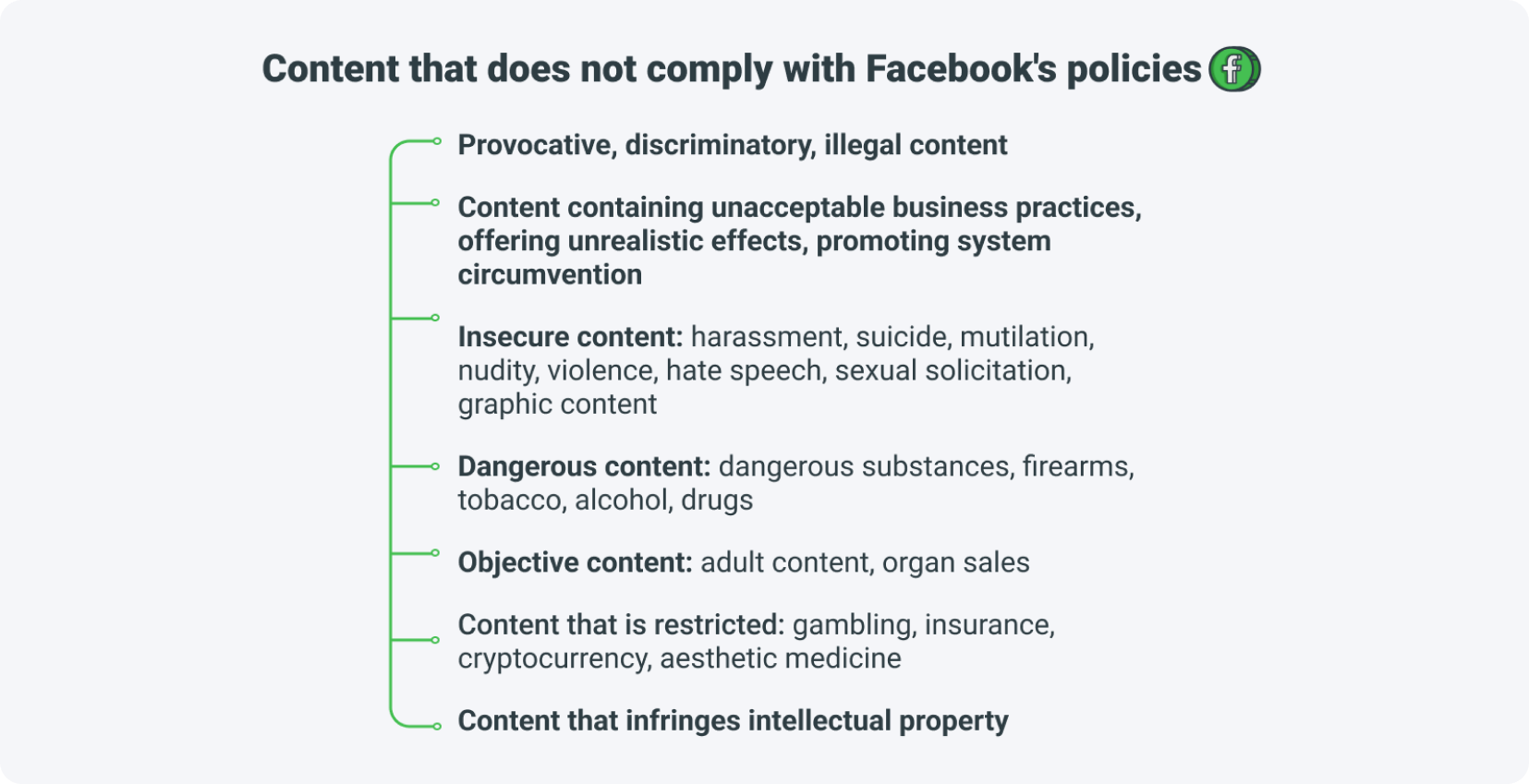
Facebook groups non-compliant content into clear categories:
Provocative, discriminatory, or illegal content
Unacceptable business practices — unrealistic effects, promoting system circumvention
Insecure content — harassment, suicide, mutilation, nudity, violence, hate speech, sexual solicitation
Dangerous content — dangerous substances, firearms, tobacco, alcohol, drugs
Objective content — adult content, organ sales
Restricted content — gambling, insurance, cryptocurrency, aesthetic medicine
Intellectual property infringement
Each ad is reviewed within 24 hours, most of it automatically by bots and only a fraction by human moderators, so not every ad is banned. If yours is, you can submit a re-verification request. To avoid ad-driven bans, keep creatives high quality and on-topic, drop suspicious words, and make sure every promotion complies with the rules — our guide on cloaking offers on Facebook explains how.
How do payment problems trigger a Facebook ban?
Payment problems cause a Facebook ban when the platform repeatedly fails to charge a card or when a card already on its blacklist is connected. Facebook records every card used; once one is blocked, reusing it on a new account or campaign frequently leads to a ban and to payments being held.
Failed charge attempts — if a card is rejected repeatedly and Facebook cannot charge the account, future payments may be held.
Using blocked cards — Facebook blacklists cards that failed before; reconnecting one on another account or campaign invites a ban.
How do you protect yourself from a payment-related Facebook ban? Register the card in the country where the campaign runs or where the ads are directed, and avoid frequent payment changes, which make the algorithm suspicious. For more on the tools that help with payments, read our detailed Facebook monetization guide.
Can user complaints get you banned on Facebook?
Yes — a large volume of user complaints can trigger a Facebook ban. The platform lets users report content, and reports typically concern offensive material, unrealistic promises, landing pages that do not match the promoted product, or accounts flagged as spam. Every report is verified, so not every complaint results in a ban.
Complaints usually relate to the fact that:
the content is offensive,
you promise users unrealistic actions or results,
your landing page does not match the product you promote,
users report the account as spam.
How do you avoid complaints that lead to a Facebook ban? Match your ads to your profile's theme, monitor comments, and add a contact option so users can voice dissatisfaction instead of reporting you. Treating reports as a quality signal is one of the mistakes to avoid in affiliate marketing that protects your account long term.
Key takeaways
Warm up every new account before advertising — sudden activity is the fastest route to a Facebook ban.
Keep your IP address, browser, and User Agent consistent; use an anti-detect browser if you must change them.
Avoid prohibited ad words (earnings, profit, payout, income) and misleading clickbait creatives.
Never reuse cards, creatives, or admins linked to a previously banned account.
Start paid campaigns with a modest budget and scale gradually to avoid algorithmic suspicion.
Every ad is reviewed within 24 hours, and you can submit a re-verification request if you are banned wrongly.
FAQ
1. How long does Facebook take to review an ad?
Every ad is reviewed within 24 hours. Most checks are automated by bots, and only a few go through manual human verification, so well-structured ads usually clear quickly.
2. Can you appeal a Facebook ban?
Yes. If you believe the ban was applied wrongly, you can submit a re-verification request, and Facebook will review the account or ad again.
3. What words can get your Facebook ad banned?
Words like "earnings", "profit", "payout", and "income" can trigger a ban — even when masked with symbols such as "@". Keep them out of your ad copy.
4. Do anti-detect browsers help avoid a Facebook ban?
Yes. An anti-detect browser lets you keep a consistent profile and manage your IP address and fingerprint, which lowers ban risk when you operate more than one account.
5. Is warming up a Facebook account necessary?
Yes, especially before running paid ads. A warm-up period of normal activity signals that you are a real user and protects a new account from an early ban.
Summary
Avoiding a Facebook ban comes down to discipline: warm up your account, keep your technical settings consistent, follow ad and payment rules, and respect copyright and Facebook policy. Promote safely with tools like HideLink, and create a free MyLead publisher account to access campaigns built for social traffic.
Have any questions? Feel free to reach us through our channels.