Blog / Affiliate marketing
How does Facebook monetization work, from account setup to launch?
This article is updated regularly
Last update:
06 June 2025
Facebook monetization in affiliate marketing means earning commissions by promoting offers through Facebook ads, where success depends on careful account preparation. The process covers five stages: acquiring a quality account, configuring a proxy, setting up an anti-detect browser, warming up the profile, and launching ads after linking a payment card.
This guide walks you through each step of Facebook monetization, from buying the right account to fixing the most common ad-account problems. Every stage follows a scheme used in real campaigns.
What you'll learn from this article:
how to choose and buy a Facebook account suited to affiliate ads,
which proxy and anti-detect browser settings keep your profiles safe,
how to warm up a profile and launch your first promoted post,
how to fix the most common ad-account errors and bans.
How does Facebook monetization with affiliate links work?
Facebook monetization with affiliate links works by promoting offers through paid ads from a prepared account, then earning a commission for every conversion. The scheme follows five stages: acquiring a trusted account, adding a proxy, configuring an anti-detect browser, warming up the profile, and running ads after linking a card.
This tutorial was built with MyLead partner Kreator, who runs this scheme regularly in live campaigns. Before you start, prepare your consumables — account tabs, a proxy and a configured browser — then follow each step in order. If the model is new to you, begin with the fundamentals of affiliate marketing for beginners.

How do you choose a Facebook account for affiliate ads?
Facebook scrutinizes accounts heavily, so a random profile will not work. The best results come from accounts with genuine user activity, because behavior signals to Facebook whether a profile is real. You buy aged accounts from marketplaces such as Deer and Lequeshop, then test small batches before scaling, since profile quality changes constantly.
Consistency matters: your account GEO, proxy and browser identity should align so your digital fingerprint looks like a real person. Mismatched signals are the fastest route to a verification check.
Accounts split into two categories:
Auto-registered accounts — created for sale by software or bots; recommended for whitehat work.
Real accounts — previously used by genuine owners and now resold; recommended for greyhat work (prohibited by Facebook policy). Both categories hold strong and weak profiles, so always test.
Before buying, check these six parameters:
IP address — avoid Russian IPs (ad restrictions for RU accounts) and match the account GEO to your proxy GEO.
Account activity — the biggest factor in results; a warmed-up account that promoted white-hat offers is a plus, but you can only confirm quality in practice. Registration from a mobile phone is a good sign.
Avatar and photos — a profile picture and several photos imitate natural user behavior.
Advertising-ban verification — no longer critical, since you complete it yourself after purchase. Go to the Account Quality section, select 'Your personal advertising account' and follow the steps; verification takes 2 to 24 hours.
Year of registration — ideally 2020 or earlier, though newer 2022 accounts with strong activity can also be high quality.
Gender — women's accounts are recommended; the current price is $1.5 to $4.5, since cheaper accounts are usually poor and pricier ones rarely justify the cost.
On the MyLead YouTube channel, an expert explains the Facebook platform in detail and highlights what matters when promoting campaigns there.

Which proxy should you use for Facebook accounts?
For the best price-to-quality ratio, mobile proxies from about $35 per month work well. Cheaper individual server proxies (1-2 USD per month, e.g. Proxyline) are a viable starting point, but mobile socks5 proxies remain the safer choice. Your proxy GEO can be anything except Russia — ideally an EU country or Ukraine.
Ukrainian GEO is convenient because many available accounts are Ukrainian. One rule for single server proxies: you need a separate proxy server for every account — never share one proxy across multiple profiles.

How do you set up an anti-detect browser like Dolphin?
An anti-detect browser isolates each Facebook account in its own profile with a unique digital fingerprint. We recommend Dolphin, which has a free plan for 10 profiles, so you can run 10 accounts at once. Setup covers basic settings (name, tags, OS, source, proxy, cookies) and advanced fingerprint parameters that must be replaced.
Dolphin's free tier is enough to start, and you can compare alternatives in our review of the best anti-detect browsers. Configure each profile in two parts.
Basic profile settings:
Set a name — for example the account serial number and login.
Add tags to find the right account later (e.g. nutra, pl).
Choose the operating system that matches your device.
Set the source to Facebook.
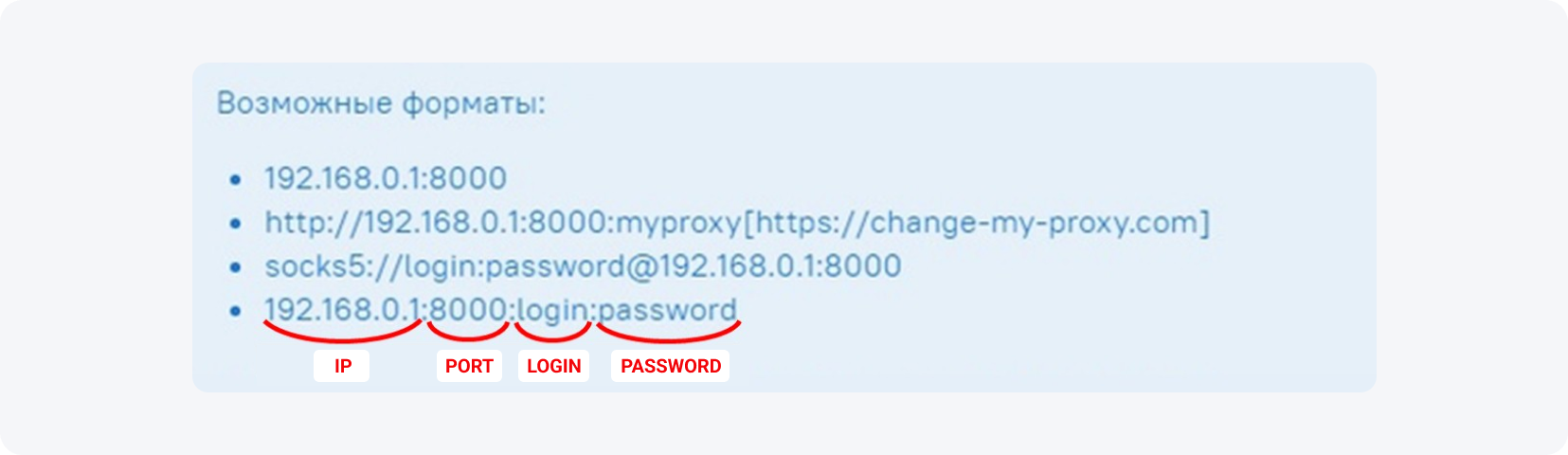
Add the proxy, separating IP address, port and (if provided) username and password with a colon.
If the account came with cookies, import them as a file or paste the text into the field.
Advanced profile settings:
User agent — if none is supplied, use the one Dolphin proposes.
WebRTC — almost always worth replacing.
Real Canvas.
WebGL — replace it and choose 'noise'.
'About WebGL' — pick a random graphics card.
Timezone — set 'auto' to match the IP zone, or set the account's previous zone manually if known.
Language — set it manually: the account's location language plus English (Polish + English, Spanish + English, and so on).
Geolocation — set to 'auto' and deny location requests while you work.
Processor and memory parameters — set them manually.
Review every setting in the right-hand panel, and once everything is correct, save the profile.

How do you warm up a Facebook account before running ads?
Warming up means using a fresh account like a normal person for about four days before any ads, which minimizes Facebook blocks. You log in from a clean IP, browse the feed, watch videos, like and comment, then build credibility with cookies and a fanpage. Running ads on day one guarantees poor profile quality and bans.
How do you build account credibility with cookies?
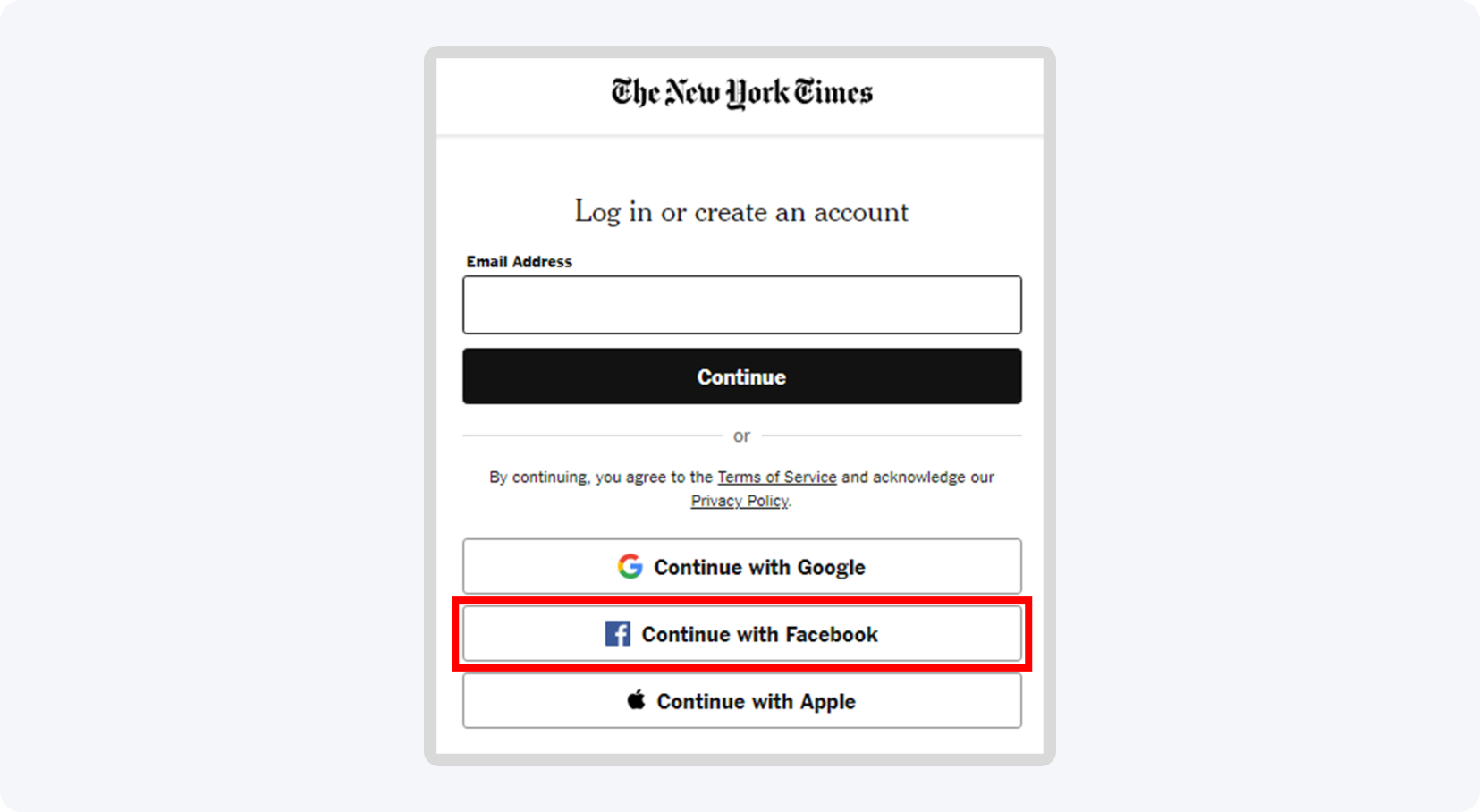
Cookies make your profile look established before the first login. Install the Link Grabber extension, search a neutral query like 'How To Lose Weight Quickly' in your account language, and copy links across several result pages. Then use the Boost Cookie extension to open them gradually with at least a two-second delay, raising your profile's credibility.
On the first visit, avoid active steps — just look at the board. For real used accounts, turn off notifications in settings, leave, and return after a few hours to start light activity. Logging into foreign shops or news portals with your Facebook account also helps, and the Facebook Pixel Helper extension confirms which sites carry a pixel.
How do you create and promote a fanpage?
After a few days of one-to-two daily visits, create a fanpage (business page). For white offers, build a thematic page; for grey offers like most Nutra campaigns, pick a neutral, unrelated topic. Fill in the page info, upload an avatar, and publish several link-free posts for a few days before any promotion.
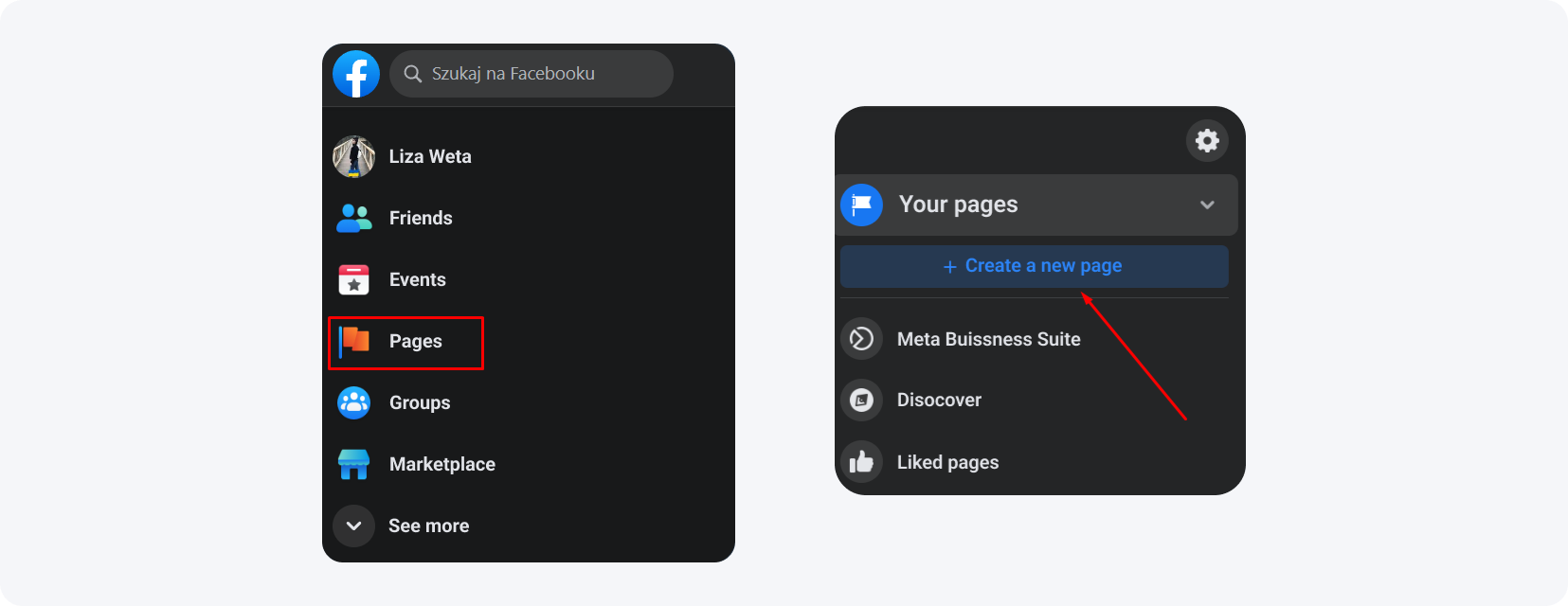
Then promote a post with the 'Promote Post' button below it. Leave the settings automatic and set a small budget of about $2 a day for a few days to keep the page active.

How do you link a payment card to Facebook?
To start promotion you must link a Visa or Mastercard to Facebook. You can use virtual cards from providers like Revolut, Advcash, Capitalist or Wise. Promote a post for $1-2 first — this builds Facebook's trust in your ad account and makes the fanpage more active before you move ads into Ad Manager.
Revolut — virtual Visa/Mastercard for EU users.
Advcash — multi-currency cards and accounts.
Capitalist — register the account on your data and issue the card to random data of any EU country.
Wise — multi-currency card with low fees.
Once the promoted post performs well, disable post promotion in Ad Manager and launch your ads — ideally one ad per account, scaling to four once everything is stable. At this stage a link cloaker like HideLink from MyLead protects your campaigns, and pairing it with the best paid traffic for CPA offers improves your results.

What are the most common Facebook monetization problems?
The most common problems are document-verification requests, card-charge errors after linking, foreign-language interfaces, and advertising-account bans. Most are fixable: send a valid document, retry pre-authorized billing, switch the interface language, or appeal through Facebook's support forms. Trusted cards and well-warmed accounts prevent the majority of these issues.
Most bans trace back to avoidable errors — review the mistakes that get you banned on Facebook and the habits that help you avoid getting your account blocked before you scale.
Document verification — any document works. Photograph it, send it to yourself on Telegram, download the photo (Telegram strips the metadata), then upload it to Facebook.
Inactive account after linking a card — usually a Risk Payment error from an untrusted card or low account trust. Open the Billing section and complete pre-authorization; if that fails, edit the ad and retry, pause the account briefly, or change the card.
Foreign-language interface — use a translator extension or append &locale=en_US to the URL for English, for example facebook.com/.../ads?act=xxxx&locale=en_US.
Banned ad account — contest bans and other issues through Facebook's dedicated support forms.
Key takeaways
Random Facebook accounts fail — buy aged, active profiles (women's accounts cost $1.5-$4.5) and test small batches first.
Use mobile proxies (from $35/month) with a separate proxy per account, and never a Russian GEO.
An anti-detect browser like Dolphin (free for 10 profiles) isolates each account with a replaced fingerprint.
Warm up every account for about four days before ads, building credibility with cookies, a fanpage and small $1-2 promotions.
Link a trusted Visa/Mastercard (Revolut, Wise, Advcash, Capitalist) and run one ad per account, scaling to four when stable.
Most bans and charge errors are preventable with trusted cards, warmed accounts and a link cloaker like HideLink.
FAQ
1. Can you do affiliate marketing on Facebook?
Yes. You promote affiliate offers through paid ads from a prepared account and earn a commission per conversion. Success depends on account quality, a clean proxy, an anti-detect browser and proper warming up.
2. Why does Facebook ban affiliate accounts?
Facebook bans accounts for suspicious behavior, untrusted cards, fast activity on cold profiles and ads sent straight to affiliate links. Warming up and a link cloaker like HideLink reduce the risk.
3. How much does a Facebook account for ads cost?
Quality women's accounts cost between $1.5 and $4.5. Cheaper accounts are usually poor quality, while overpriced ones rarely justify the cost for the results they deliver.
4. Do you need a proxy for Facebook affiliate marketing?
Yes. Each account needs its own proxy with a matching GEO (never Russia). Mobile proxies from about $35 per month offer the best balance of price and safety.
5. How long should you warm up a Facebook account?
Warm up a new account for about four days, using it like a normal user. Skipping this step lowers profile quality and increases the chance of a ban.
Summary
Facebook monetization is achievable when you treat account preparation as seriously as the ads: a trusted account, a matching proxy, an anti-detect browser and a patient four-day warm-up. Follow the scheme step by step, and if something fails, switch accounts and start again. Join MyLead for free and start earning, and reach out to partner Kreator for more Facebook tips.

Have any questions? Feel free to reach us through our channels.