
Blog / MyLead Guide
What Can You Manage in MyLead My Profile Settings?
This article is updated regularly
Last update:
08 December 2025
The MyLead My Profile page is the central settings hub you open by clicking your email address in the top-right corner of the publisher panel. It groups seven sections — General, Personal data, Security, Social Media, Payments, Notifications, and Activity — where you configure your dashboard language, currency, payment methods, two-factor authentication, and login history in one place.
This guide breaks down what each My Profile section controls and how to lock down your account against unauthorized access. Everything below maps directly to the live publisher panel.
What you'll learn from this article:
how to open the My Profile page and what each of its seven sections does,
where to change your dashboard language, currency, and lead sound,
how to secure your account with two-factor authentication and login monitoring,
how to set up payment methods and notification preferences.
What is the MyLead My Profile page?
The MyLead My Profile page is your account control center, opened by clicking your email in the top-right corner of the dashboard. It stores account preferences, security options, and payout setup across seven shortcut tabs. Every change is saved with the Save changes button, so settings apply only after you confirm them.
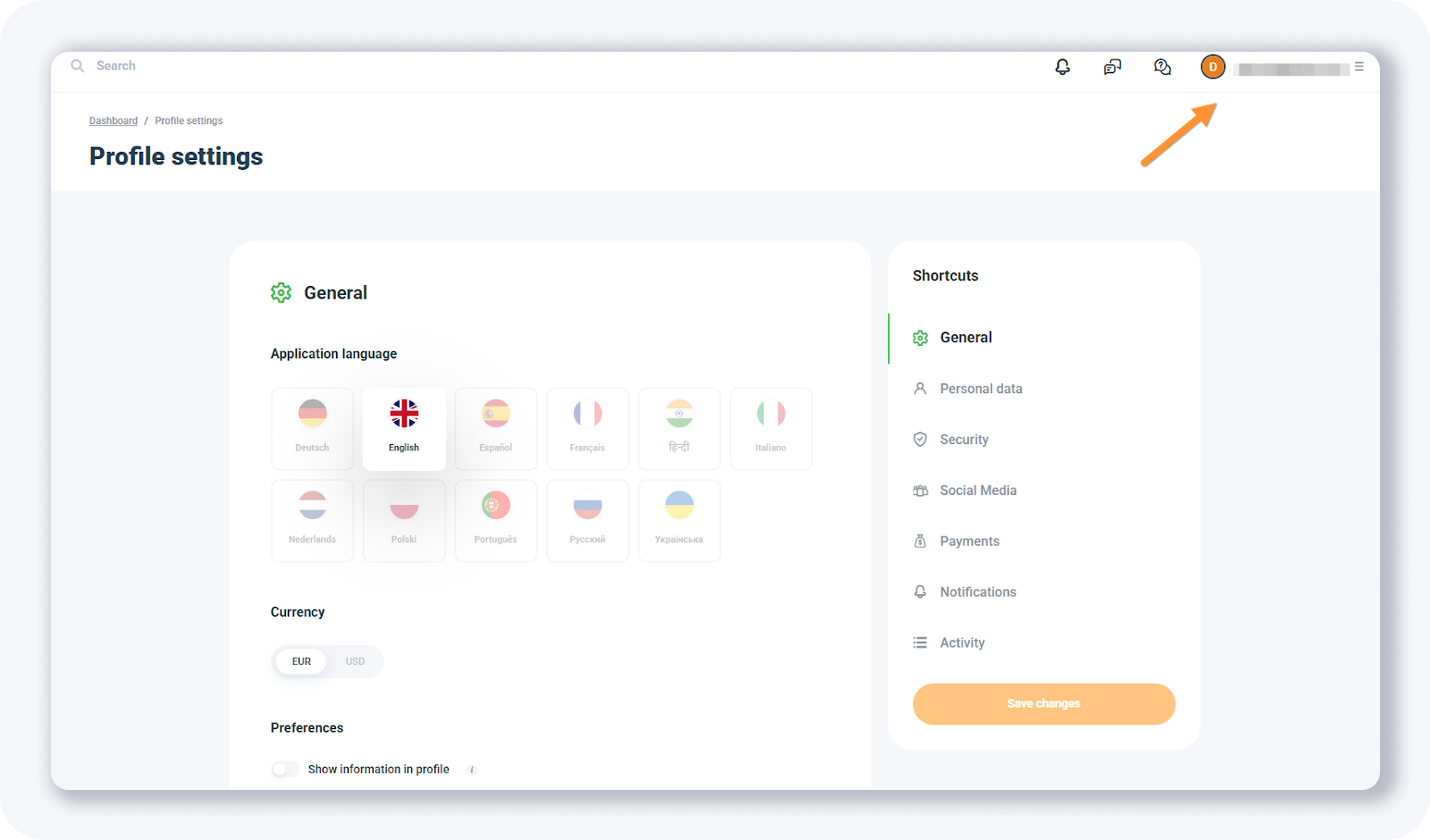
If you have just completed the account creation process, this is the first place to personalize before promoting. The profile sits next to the MyLead main dashboard, which tracks your live stats and earnings.
What sections does the MyLead My Profile page include?
The MyLead My Profile page includes seven sections, each handling a distinct part of your account: General, Personal data, Security, Social Media, Payments, Notifications, and Activity. Together they cover interface preferences, identity details, account protection, payout configuration, and login history — the full setup a publisher needs before scaling campaigns.
General — pick your dashboard language (12 available), set your preferred currency, and choose or mute the sound that plays on every new lead.
Personal data — update your avatar, first and last name, phone number, address, and account type.
Security — change your password, enable two-factor authentication, and manage login options for the mobile app.
Social Media — connect your social accounts to your profile.
Payments — set up any of 7 payment methods so you can withdraw your earnings without delay.
Notifications — choose email or SMS alerts and switch between daily or monthly updates.
Activity — review your most recent logins to spot unauthorized access.
How do you secure your MyLead account?
You secure your MyLead account through the Security and Activity sections. Security holds password changes, two-factor authentication, and mobile login management, while Activity logs your recent sign-ins. Two-factor authentication adds a second verification step, so a stolen password alone cannot grant access to your account.
If the Activity tab shows suspicious logins — for example, unknown IP addresses — change your password immediately and notify your account manager. For the wider rule set, read how to keep your account from being blocked.
Key takeaways
The MyLead My Profile page opens from your email menu in the top-right corner and holds seven settings sections.
General controls language (12 options), currency, and lead sound; Personal data stores your identity details.
Security and Activity protect your account through two-factor authentication, password changes, and login monitoring.
Payments supports 7 methods, while Notifications lets you pick email or SMS alerts on a daily or monthly cycle.
Complete MyLead Guide - Chapter list
1. How to register on MyLead - click to read
2. Main Dashboard - click to read
3. My Profile - now reading
4. Offers (Affiliate Campaigns) - click to read
5. Surveys - click to read
6. OfferWall Rewards - click to read
7. Content Lockers - click to read
8. CPA Locker
9. Captcha Locker
10. File Locker
11. Mobile Rewards
12. Icent Campaigns
13. Offer API
14. Smartlniks - click to read
15. Free Affiliate Tools - click to read
16. Coupons and promotions
17. HideLink
18. Passage of Offers
19. Damaged Links
20. Withdrawals - click to read
21. Statistics and Reports - click to read
22. Postbacks - click to read
23. Adding MyLead as an Affiliate Network to your Tracker - click to read
24. How to Add MyLead Offers to the Tracker - click to read
25. How to Add MyLead Lockers (as an Offer) to Tracker - click to read
26. How to Add MyLead Smartlinks (as an Offer) to Tracker - click to read
27. Community and News - click to read
FAQ
1. How do you open the My Profile page on MyLead?
Click your email address in the top-right corner of the dashboard to open the menu, then select your profile to reach the settings and preferences page.
2. How many languages does the MyLead dashboard support?
The MyLead dashboard is available in 12 languages, which you switch in the General section of My Profile at any time.
3. How do you enable two-factor authentication on MyLead?
Open the Security section in My Profile, where you can change your password, enable two-factor authentication, and manage mobile app login options.
4. How do you set up payments on MyLead?
Go to the Payments section to configure any of 7 payment methods, then request a withdrawal once your balance is ready.
Summary
The MyLead My Profile page centralizes every account setting — from dashboard language and currency to security, payments, and login history — across seven clearly labeled sections. Configure each one before scaling your campaigns, and check the Activity tab regularly. Create your free MyLead publisher account to start customizing your profile today.
Have any questions? Feel free to reach us through our channels.