
Blog / MyLead Guide
What Are the 10 Reports in MyLead Statistics and Reports?
This article is updated regularly
Last update:
10 December 2025
MyLead Statistics and reports is the panel section that gathers 10 dedicated reports tracking affiliate performance. Each report breaks down visits, leads, conversion rate, earnings and EPC (earnings per click) across a different dimension — by day, campaign, configuration, country, smartlink or HideLink. Together they give publishers a complete, real-time view of what drives results.
This guide walks you through all 10 MyLead reports and what each one measures. You'll learn how to read the data and optimize your affiliate campaigns.
What you'll learn from this article:
which 10 reports the MyLead Statistics and reports section includes,
what metrics each report tracks — visits, leads, conversion rate and EPC,
how the Daily, Campaigns and Configurations reports differ,
when to use the Countries, Smartlinks and HideLink reports.
What is the Statistics and reports section in MyLead?
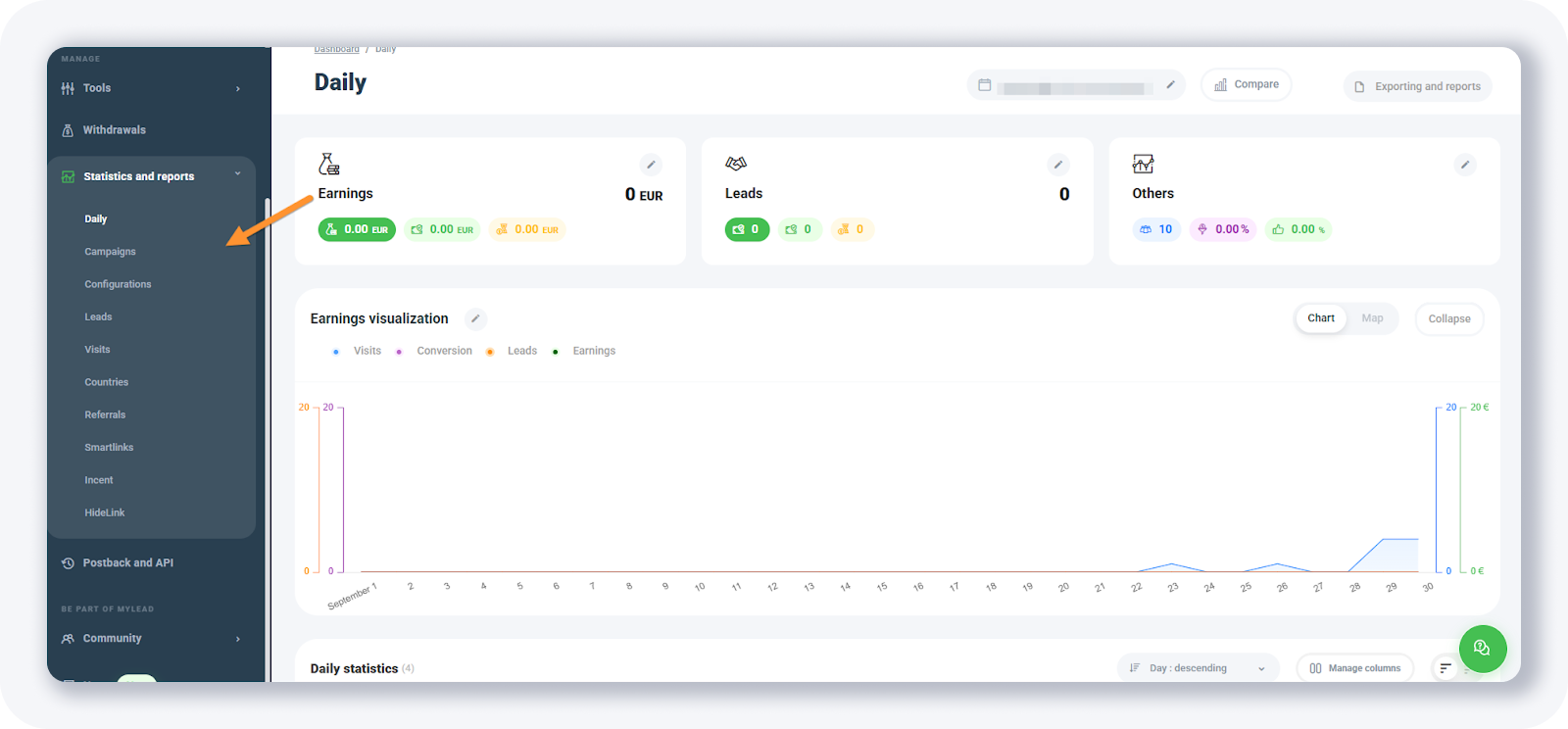
The Statistics and reports section is the analytics hub of the MyLead publisher panel, holding 10 separate reports. Each report shows the same core metrics — visits, leads, conversion rate, earnings and EPC — but sliced by a different dimension. It sits in the left-hand menu, between Withdrawals and the Postback and API settings.
All metrics update in real time, so a conversion appears the moment it happens. For a full walkthrough of the panel layout, see the dedicated Statistics and reports guide.
What are the 10 reports available in MyLead?
MyLead offers 10 reports: Daily, Campaigns, Configurations, Leads, Visits, Countries, Referrals, Smartlinks, Incent campaigns and HideLink. The first three summarize performance over time, by campaign and by configuration. The rest isolate a single angle — a country, a smartlink, referrals or cloaked HideLink traffic — so each one pinpoints exactly where leads and earnings come from.
Daily report — visits, leads, conversion rate and earnings in a top chart, plus a table with leads, earnings, visits, conversion rate and EPC per day.
Campaigns report — the same metrics as the daily report, grouped per campaign instead of per day.
Configurations report — performance per campaign and per configuration it belongs to, such as a smartlink or A/B test.
Leads report — a chart of your lead count above a table of day-by-day lead statistics.
Visits report — a live-visits view listing campaign name, configuration, visitor country, referrer and the date and time of each visit.
Countries report — statistics per country: leads, earnings, visits, conversion rate and EPC.
Referrals report — the commission earned from referrals in your MyLead account.
Smartlinks report — statistics per smartlink, including leads, earnings, visits, conversion rate and EPC.
Incent campaigns report — statistics for any incentive (incent) campaigns you run.
HideLink report — statistics for traffic when you use HideLink as a cloaker.
How do you read the data in MyLead reports?
Every MyLead report combines five core metrics. Visits count link clicks, leads count completed conversions, and conversion rate is leads divided by visits. Earnings show the publisher's commission, while EPC reveals how much each visit is worth. Read together, they reveal which campaigns, countries or smartlinks deserve more traffic.
Use the Compare button to view two time periods side by side, or Exporting and reports to download your data. For a deeper look at the numbers that matter, read our guide to key affiliate metrics.
Key takeaways
MyLead's Statistics and reports section contains 10 reports, each tracking visits, leads, conversion rate, earnings and EPC.
The Daily, Campaigns and Configurations reports cover the same metrics over time, per campaign and per configuration.
The Countries report reveals your best-converting GEOs, while the Smartlinks report isolates performance per smartlink.
EPC is the fastest signal of which traffic is worth scaling — high EPC means each click pays more.
The Visits report works like a live tracker, logging country, referrer and timestamp for every click.
Complete MyLead Guide - Chapter list
1. How to register on MyLead - click to read
2. Main Dashboard - click to read
3. My Profile - click to read
4. Offers (Affiliate Campaigns) - click to read
5. Surveys - click to read
6. OfferWall Rewards - click to read
7. Content Lockers - click to read
CPA Locker - click to read
Captcha Locker - click to read
File Locker - click to read
Mobile Rewards - click to read
Icent Campaigns - click to read
Offer API - click to read
8. Smartlniks - click to read
9. Free Affiliate Tools - click to read
Coupons and promotions - click to read
HideLink - click to read
Passage of Offers - click to read
Damaged Links - click to read
10. Withdrawals - click to read
11. Statistics and Reports - click to read
12. Postbacks - now reading
13. Adding MyLead as an Affiliate Network to your Tracker - click to read
14. How to Add MyLead Offers to the Tracker - click to read
15. How to Add MyLead Lockers (as an Offer) to Tracker - click to read
16. How to Add MyLead Smartlinks (as an Offer) to Tracker - click to read
17. Community and News - click to read
FAQ
1. How many reports does MyLead's Statistics and reports section have?
MyLead provides 10 reports: Daily, Campaigns, Configurations, Leads, Visits, Countries, Referrals, Smartlinks, Incent campaigns and HideLink. Each tracks the same core metrics from a different angle.
2. What is EPC in MyLead reports?
EPC (earnings per click) is your average commission per visit — total earnings divided by total visits. A higher EPC means each click is worth more, so it's an easy way to compare campaigns and traffic sources.
3. Where do I configure postbacks in MyLead?
Postbacks sit in the separate Postback and API section, just below Statistics and reports in the panel menu. See our guide to postback in affiliate marketing to set up server-to-server tracking.
4. What does the HideLink report track?
The HideLink report shows statistics for traffic you cloak with HideLink. If you haven't set it up yet, learn how to complete a HideLink application first.
Summary
MyLead's Statistics and reports section turns raw activity into 10 focused reports, each tracking visits, leads, conversion rate, earnings and EPC from a different angle. Reading them together shows exactly which campaigns, countries and smartlinks to scale. New to MyLead? Create a free publisher account and watch these reports fill with your own data.
Have any questions? Feel free to reach us through our channels.