
Blog / MyLead Guide
How Do MyLead Withdrawals Work? Payout Page Explained
This article is updated regularly
Last update:
09 December 2025
The MyLead withdrawals page is where you track your affiliate earnings and request a payout once your balance is approved. It organises your commissions into three tabs — Withdraw the money, Order history, and Additional top-ups and deductions — and splits pending earnings into four clear statuses, so you always know what is ready to pay out.
This guide breaks down each tab and every commission status on the MyLead withdrawals page, so you can read your balance correctly and know exactly when your money is ready to withdraw.
What you'll learn from this article:
how to read your affiliate earnings on the MyLead withdrawals page,
what the three withdrawals tabs actually do,
what the four commission statuses — Available to pay, Accepted, Pending and Rejected — mean,
why a withdrawal can be temporarily unavailable, and what unlocks it.
How do I withdraw money from MyLead?
To withdraw money from MyLead, open the withdrawals page from your dashboard, go to the Withdraw the money tab, and submit a payout request once your approved balance reaches the minimum threshold. The page shows your earnings split by status, so you can see exactly how much is ready before you request payment.
You only need this page after your campaigns start converting, so it becomes useful once traffic flows. Track which offers generate those conversions across your MyLead dashboard, and review your active affiliate campaigns to keep approved commissions growing.
What are the three tabs on the MyLead withdrawals page?
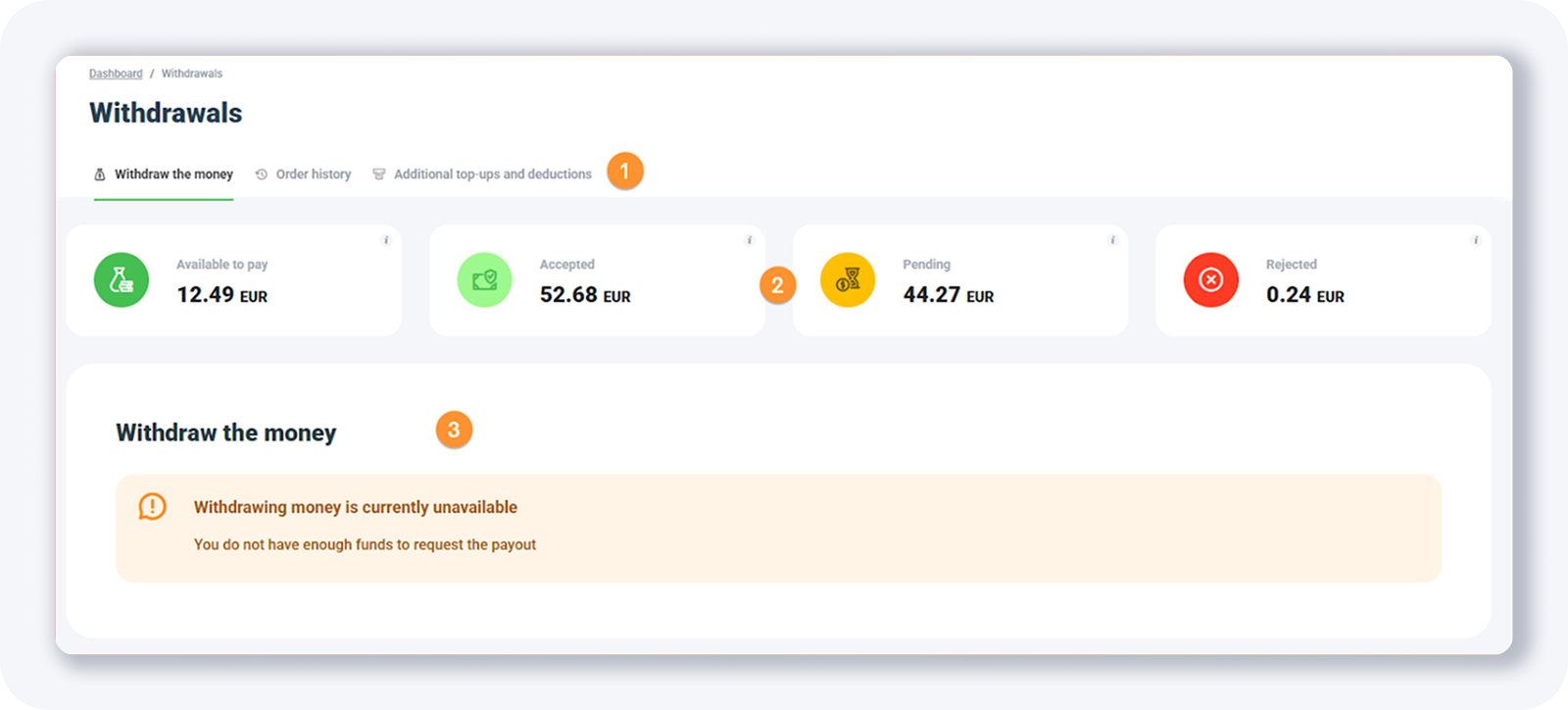
The MyLead withdrawals page has three tabs that separate how you manage your money. Withdraw the money is the main view for checking earnings and requesting a payout, Order history lists every past payout, and Additional top-ups and deductions records manual balance changes made by the system or an administrator. Each tab covers a distinct part of your account.
Withdraw the money — the main page where you see how much you have earned and request a payout once your balance reaches the minimum threshold.
Order history — a chronological record of all your previous payouts.
Additional top-ups and deductions — every manual deduction or top-up applied by the system or administrators; when there are problems calculating leads they are added here, and leads collected in an illegal manner can be cancelled.
For the full payout walkthrough, including how to set your withdrawal details before requesting money, follow our step-by-step guide to withdrawing your money.
What do the four MyLead commission statuses mean?
Inside the Withdraw the money tab, MyLead splits your commissions into four statuses: Available to pay, Accepted, Pending and Rejected. They show how far each commission has moved through advertiser approval — from earnings ready to pay out, through funds still awaiting confirmation, to commissions that were rejected and will not be paid.
Available to pay — commissions approved and ready for payout (the total of approved commissions not yet paid out).
Accepted — commissions accepted by the advertiser and awaiting approval; once the funds are accepted, MyLead proceeds with the payout.
Pending — commissions awaiting approval from the advertiser; after the customer completes the action and it is approved, MyLead proceeds with the payout.
Rejected — rejected commissions that will not be paid out, calculated since your last payout.
If the tab shows that withdrawing money is currently unavailable, your Available to pay balance has not reached the minimum payout threshold yet — keep promoting until enough approved commissions accumulate. See which campaigns drive them in statistics and reports, and plan your income with our guide to affiliate cash flow.
Key takeaways
The MyLead withdrawals page is your hub for checking earnings and requesting payouts once commissions are approved.
Three tabs organise everything: Withdraw the money, Order history and Additional top-ups and deductions.
Four statuses — Available to pay, Accepted, Pending and Rejected — show how close each commission is to being paid.
Only Available to pay funds can be withdrawn; the rest are still moving through advertiser approval.
Withdrawal stays unavailable until your balance reaches the minimum payout threshold, so keep driving conversions.
Complete MyLead Guide - Chapter list
1. How to register on MyLead - click to read
2. Main Dashboard - click to read
3. My Profile - click to read
4. Offers (Affiliate Campaigns) - click to read
5. Surveys - click to read
6. OfferWall Rewards - click to read
7. Content Lockers - click to read
CPA Locker - click to read
Captcha Locker - click to read
File Locker - click to read
Mobile Rewards - click to read
Icent Campaigns - click to read
Offer API - click to read
8. Smartlniks - click to read
9. Free Affiliate Tools - click to read
Coupons and promotions - click to read
HideLink - click to read
Passage of Offers - click to read
Damaged Links - click to read
10. Withdrawals - now reading
11. Statistics and Reports - click to read
12. Postbacks - click to read
13. Adding MyLead as an Affiliate Network to your Tracker - click to read
14. How to Add MyLead Offers to the Tracker - click to read
15. How to Add MyLead Lockers (as an Offer) to Tracker - click to read
16. How to Add MyLead Smartlinks (as an Offer) to Tracker - click to read
17. Community and News - click to read
FAQ
1. Where do I request a payout on MyLead?
To request a payout, open the Withdraw the money tab — the main view of the withdrawals page. There you see how much you have earned and submit a payout request for your approved commissions.
2. Why is my withdrawal currently unavailable?
Your Available to pay balance has not yet reached MyLead's minimum payout threshold. Keep promoting your campaigns until enough approved commissions accumulate, and the payout request unlocks.
3. What is the difference between Pending and Accepted commissions?
Pending commissions still await the advertiser's approval after the customer completes the action. Accepted commissions have already been confirmed and are queued for MyLead to pay out.
4. Why was my commission rejected?
Rejected commissions will not be paid out and are calculated since your last payout. Leads collected in an illegal manner can be cancelled, which moves them to this status.
Summary
The MyLead withdrawals page keeps your affiliate income transparent: three tabs and four commission statuses show exactly what you have earned, what is approved, and what is ready to pay out. Once your Available to pay balance clears the minimum threshold, your payout is one request away. Create your free MyLead publisher account and start building commissions you can withdraw.
Have any questions? Feel free to reach us through our channels.