
Blog / MyLead Guide
How Do You Earn Money With MyLead Surveys?
This article is updated regularly
Last update:
08 December 2025
MyLead surveys are a paid feature in your publisher dashboard that lets you earn extra funds by answering questions from market-research providers. After you accept the survey terms, you choose a survey, complete it honestly, and the reward is added to your MyLead balance immediately. Each survey lists its execution time and rate before you start.
This guide shows how MyLead surveys work, what your reward depends on, and the rules that keep your answers credible. You will also learn how to start your first survey.
What you'll learn from this article:
how MyLead surveys work and where to find them in your dashboard,
what determines your survey reward and how fast it is paid,
which rules protect your credibility, from truthful answers to trap questions,
how to start your first survey step by step.
How do you earn money with MyLead surveys?
You earn with MyLead surveys by answering questions for which providers pay a fixed reward. Each completed survey adds extra funds to your MyLead balance, credited immediately after you finish. Available surveys appear in your dashboard once you accept the terms, and every survey shows its execution time and EUR rate before you commit.
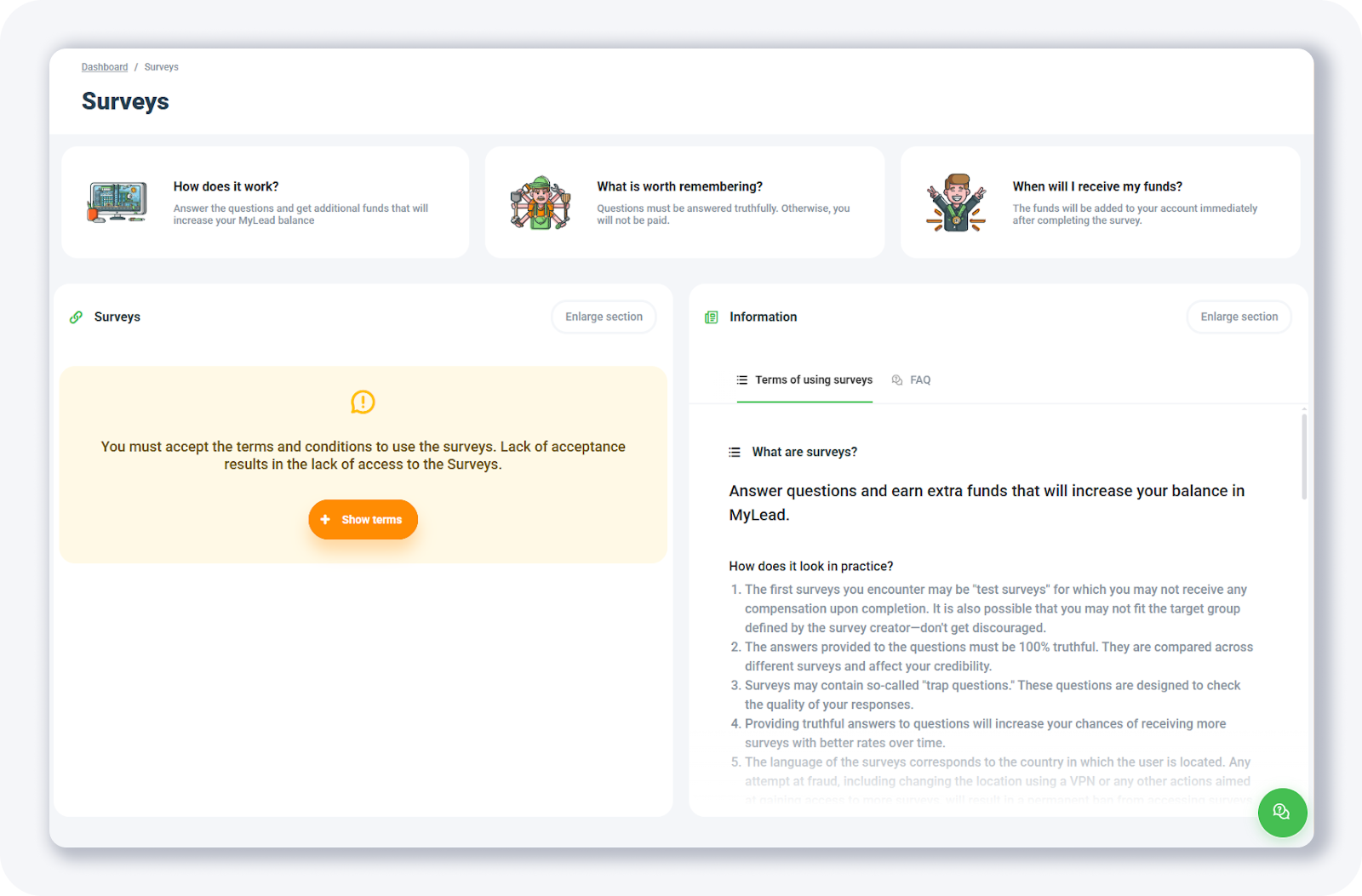
The Surveys page brings everything together: a short overview, the terms you must accept, and the list of paid surveys. It builds on the surveys for money feature, one of several MyLead earning tools in your panel.
How do you start completing surveys in MyLead?
Starting a survey in MyLead begins with accepting the terms and conditions, since the section stays locked until acceptance. The dashboard then lists the available surveys, sortable by rate. Joining a survey runs through a green plus button followed by an automatic check against the creator's target group, which decides whether the survey opens.
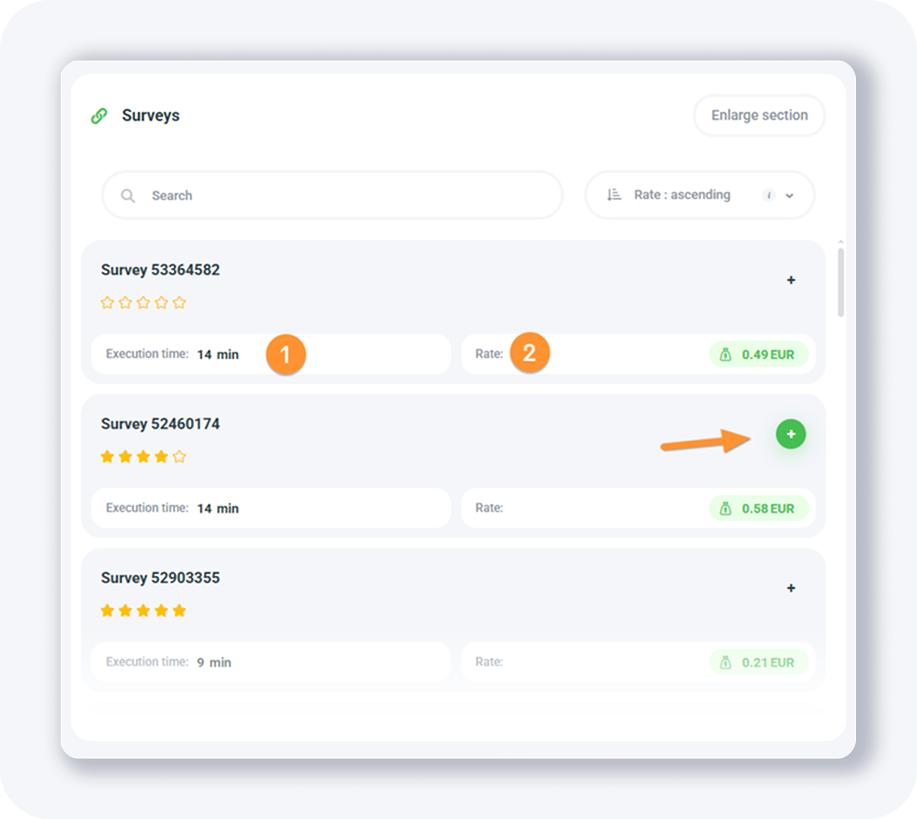
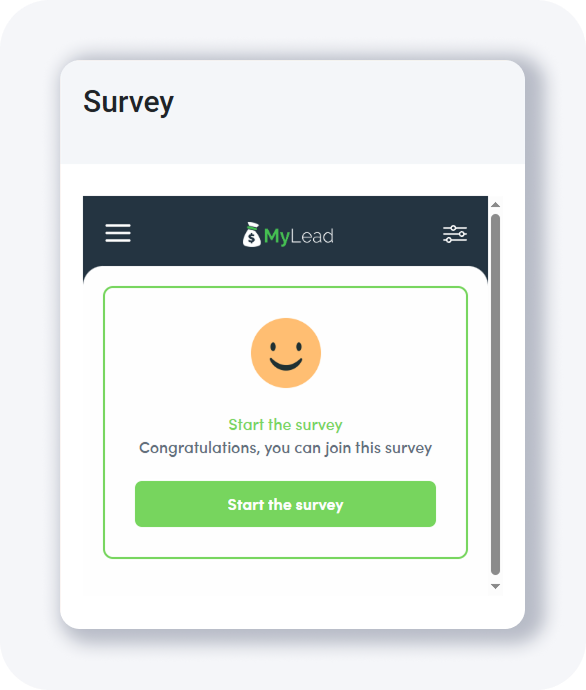
To open the list yourself, go to the Surveys section on your main dashboard and click Show terms to accept the terms and conditions. Then pick a survey, click the green plus button, and confirm. When you match the target group, a confirmation screen welcomes you with a Start the survey button.
What should you know before completing surveys?
Several rules govern MyLead survey payouts. Answers must be 100% truthful, because providers compare responses across surveys and embed trap questions that verify quality and protect a publisher's credibility. The first surveys are often unpaid test surveys, and a survey opens only for users who match the creator's target group. Consistent, honest answers unlock more surveys with higher rates.
Truthful answers only — responses are compared across surveys, and trap questions catch low-quality input.
Immediate funds — the reward lands on your MyLead balance right after you finish a survey.
Test surveys — the first surveys you encounter are often unpaid trials.
Target group — the creator defines who qualifies, so you will not pass every screening.
Language and location — surveys match the country you are in, and masking it with a VPN risks losing rewards.
Every reward lands on your MyLead balance the moment you finish a survey and sits alongside your affiliate commissions. From there you cash it out through the standard withdrawal process, with no separate handling for survey income.
Key takeaways
MyLead surveys add extra funds to your account balance for completing questionnaires found in your dashboard.
You must accept the survey terms first — without acceptance the Surveys section stays locked.
Each reward is credited immediately to your MyLead balance after you finish a survey.
Honest, consistent answers raise your credibility and unlock more surveys with higher rates over time.
Test surveys and target-group screening mean some surveys pay nothing, which is normal at the start.
Complete MyLead Guide - Chapter list
1. How to register on MyLead - click to read
2. Main Dashboard - click to read
3. My Profile - click to read
4. Offers (Affiliate Campaigns) - click to read
5. Surveys - now reading
6. OfferWall Rewards - click to read
7. Content Lockers - click to read
8. CPA Locker
9. Captcha Locker
10. File Locker
11. Mobile Rewards
12. Icent Campaigns
13. Offer API
14. Smartlniks - click to read
15. Free Affiliate Tools - click to read
16. Coupons and promotions
17. HideLink
18. Passage of Offers
19. Damaged Links
20. Withdrawals - click to read
21. Statistics and Reports - click to read
22. Postbacks - click to read
23. Adding MyLead as an Affiliate Network to your Tracker - click to read
24. How to Add MyLead Offers to the Tracker - click to read
25. How to Add MyLead Lockers (as an Offer) to Tracker - click to read
26. How to Add MyLead Smartlinks (as an Offer) to Tracker - click to read
27. Community and News - click to read
FAQ
1. What are MyLead surveys?
MyLead surveys are paid questionnaires inside your publisher dashboard. You answer questions from survey providers and receive extra funds on your MyLead balance after each completed survey.
2. Why was my survey unpaid?
This usually happens with test surveys, which run without compensation, or when your profile does not match the survey's target group.
3. How fast are survey rewards credited?
Survey rewards are added to your MyLead balance immediately after you finish, with no waiting period or manual approval.
4. Do I need to accept terms before completing surveys?
Yes. The Surveys section stays locked until you accept the terms and conditions; after acceptance, the full list of available surveys appears.
Summary
MyLead surveys turn a few minutes of honest answers into extra funds credited straight to your account balance. Accept the terms, complete surveys that match your profile, and steady, truthful answers unlock higher-rate questionnaires over time. Plan how to withdraw your survey earnings alongside your other MyLead income.
Have any questions? Feel free to reach us through our channels.